

FunClip v2.1.0: The First Versioned Local AI Video-Clipping Release
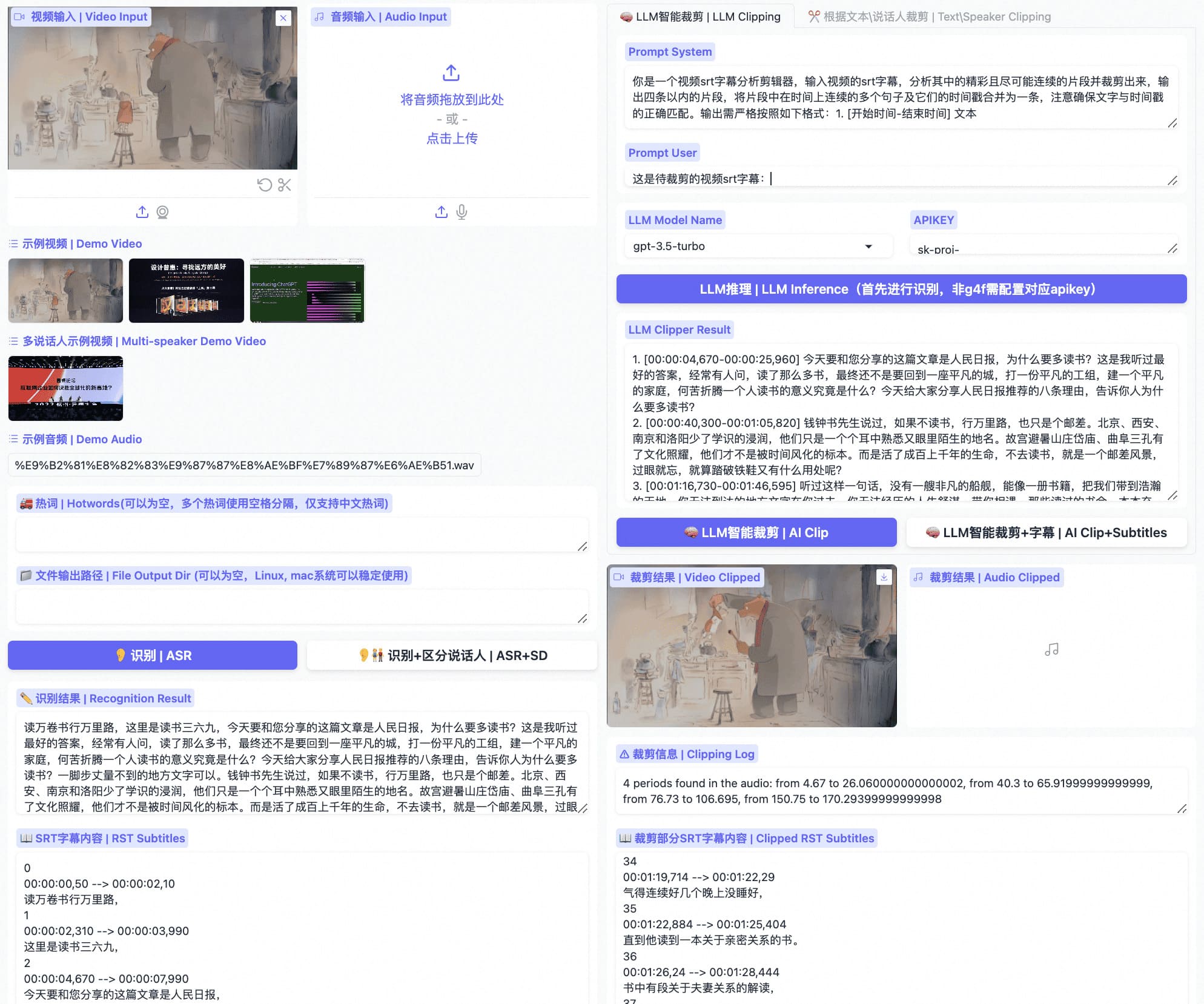
FunClip v2.1.0 is the project's first versioned GitHub release. It turns the current local video-clipping application into a downloadable, verifiable, rollback-ready snapshot: transcribe video with the FunASR model family, then cut by transcript, speaker, or LLM-selected segments.
You can run the public Space first or download the source for private local deployment. Videos, audio, and model weights stay outside the release archives.
Choose the ASR path that fits the edit
| Path | Best for | Launch command |
|---|---|---|
| Paraformer | Precise timestamps, transcript or speaker clipping, and Chinese hotwords | python funclip/launch.py |
| Fun-ASR-Nano | High-accuracy Mandarin, English, Japanese, Chinese dialect, and accent transcription; use Paraformer for precise character-level clipping | python funclip/launch.py -m fun-asr-nano |
| SenseVoice | Multilingual ASR with emotion and audio-event tags | python funclip/launch.py -m sensevoice |
| English Paraformer | English recognition with timestamp-based clipping | python funclip/launch.py -l en |
1. Try the public application first
The FunClip Hugging Face Space runs the same public application. Use it to validate video upload, ASR, subtitle selection, and AI clipping before moving private media or pinned dependencies to a local deployment.
2. Download and verify v2.1.0
Use the tar.gz archive on Linux and macOS, or the zip archive on Windows and general-purpose extraction workflows. The checksum command below verifies only archives present in the current directory:
curl -LO https://github.com/modelscope/FunClip/releases/download/v2.1.0/FunClip-2.1.0.tar.gz
curl -LO https://github.com/modelscope/FunClip/releases/download/v2.1.0/SHA256SUMS
sha256sum -c SHA256SUMS --ignore-missing

tar -xzf FunClip-2.1.0.tar.gz
cd FunClip-2.1.0
python -m pip install -r requirements.txt
python -m pip install -U "funasr>=1.3.29"
python funclip/launch.py
On Windows, run Get-FileHash -Algorithm SHA256 FunClip-2.1.0.zip and compare the result with SHA256SUMS.
3. From transcript clipping to content-aware selection
The default workflow turns a video into timestamped subtitles and lets you cut by transcript or speaker. LLM-assisted clipping sends subtitles plus your prompt to a configured provider and returns segments that the existing clip action can consume directly.
- Use a supported transcript-driven LLM provider when subtitles contain the signal you need.
- Use optional TwelveLabs Pegasus when action, scene changes, or on-screen events matter more than the transcript; Pegasus reasons over video and audio together.
- Use direct transcript or speaker selection when a human needs exact control over the output video and SRT cues.
Why these are source archives, not a wheel
FunClip is a runnable application, not a declared Python library package; the repository has no wheel-producing setup.py or pyproject.toml. v2.1.0 therefore ships two honest application snapshots and one checksum manifest:
The archives contain tracked application source, documentation, and the dependency manifest. They do not bundle runtime dependencies or model weights, so every model keeps its own license and distribution boundary.
Version relationship with FunASR 1.3.29
FunClip v2.1.0 requires funasr>=1.3.29. When SenseVoice has no token timestamps, that release exposes every VAD speech region through sentence_info, giving subtitle and clipping clients real segment boundaries. It also includes the realtime final-text and short-tail fixes from 1.3.28. See the FunASR v1.3.29 release for details.
Run one video in the Space or deploy the pinned version on your own machine. File a reproducible issue when something blocks you, and star the FunClip repository if it becomes part of your workflow.
Open the FunClip v2.1.0 release and downloads